How to protect my startup from bots or hacks?
Question
Answer
It was 2 a.m. on a Wednesday when someone on my team pinged me in full panic mode: “The database is empty, customers are tweeting screenshots.” Turned out a bot had slipped through a misconfigured firewall rule, wiped the staging cluster, and—because staging and prod shared credentials (don’t do that)—production followed. Two hours of downtime, days of cleanup, and a credibility hit that will haunt their next fundraising deck. That’s the picture I keep in mind whenever someone asks how seriously a young startup should take security.
First line of defence: put something sturdy between the internet and your servers. I default to Cloudflare because it takes five minutes to set up and buys you rate-limiting, WAF, and DDoS mitigation out of the box. Google Cloud Armor is great once you need custom rules or fancy geo-fencing, but you’ll pay for that flexibility. (Side note: whatever you pick, spend an evening reading the docs—outsourcing is fine later, yet knowing the basics yourself lets you sanity-check consultant invoices.)
Proxies also hide your real server IP, which forces attackers to go through the gate you control. Worth the modest latency hit. Yes, you can hire a contractor to wire up VPNs and tight firewall rules; just remember that “set and forget” only works if you understand what was set. I got this wrong for the first 18 months of my own company—cost us a weekend when an auto-renewed TLS cert failed silently.
Wherever you expose a form—contact page, newsletter signup, password reset—bolt on reCAPTCHA or Akismet. Leave it open and within hours you’ll be fielding offers for questionable crypto schemes and prescription pills. Spam is annoying, sure, but the bigger risk is letting attackers pipe arbitrary content into your outbound emails. Once the bots tag you as “relays spam,” your deliverability nosedives and honest customers stop seeing receipts.
Phishing remains the cheapest way for attackers to waltz past every firewall you own. Tell your team that any “quick favour” email from the CEO demanding gift cards (or worse, database exports) is probably fake. Better: establish a no-surprises rule—urgent access requests must be confirmed over Slack or a phone call. Sounds tedious; costs far less than wiring €50 k to a clever scammer.
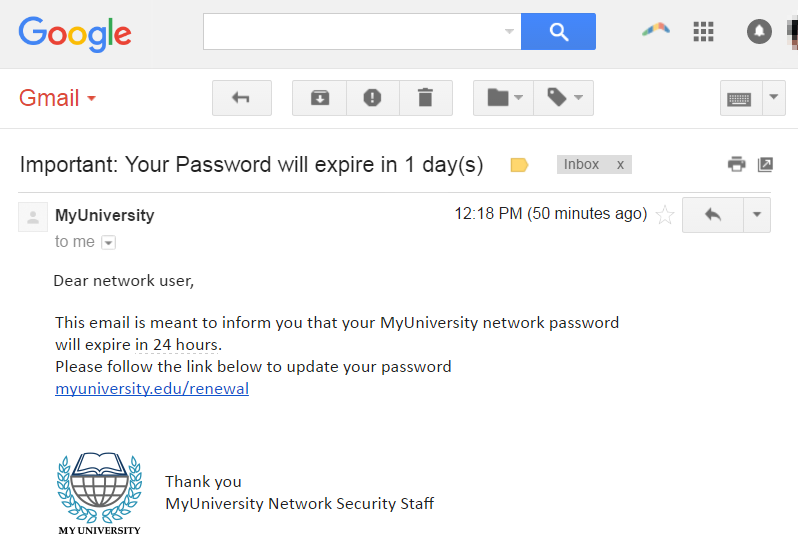
Training helps, but only if people care. I’ve seen far better compliance when employees hold equity or feel genuine ownership—suddenly clicking a suspicious link threatens their own upside. Run short, scenario-based sessions quarterly; gamify it if you must. I’m not entirely sure this scales to hundreds of staff, yet for teams under thirty it moves the needle.
Next, the obvious hygiene: install software from trusted sources only. macOS will nag you about unsigned packages; treat that prompt as a red flag, not a speed-bump. Same for browser extensions—one shady plugin with “read and change all data” permissions can torpedo your 2FA efforts in seconds.
Speaking of 2FA, slap it on everything: email, GitHub, GCP, Slack. Hardware keys beat SMS, but SMS beats nothing. I’ve yet to see a successful account takeover where a FIDO2 key was involved (small sample size, granted), whereas I’ve seen plenty where a forgotten backup code lived in plain text on Google Drive.
A password manager—1Password, Bitwarden, pick your poison—solves two problems: unique credentials everywhere and painless rotation when something inevitably leaks. If a shared “marketing@” password exists in your org right now, schedule a cleanup meeting. Tomorrow.
Backups feel dull until disaster strikes. No database should be in production without automated, tested backups and point-in-time recovery turned on. Two weeks of retention is my minimum; longer if legal requires it. And yes, you must test restores—merely seeing “backup successful” in the console lulls you into a false sense of security. I learned this the embarrassing way when an S3 lifecycle rule deleted our only snapshot.
Finally, consider a penetration test once you have real users and revenue. Prices range from $5,000 to $15,000. Pay attention to the firm’s track record and methodology; a low-quality report can leave you overconfident and still exposed. If you don’t have an in-house senior engineer, contract one just to review the findings—that cost is minor compared to patching the wrong holes.
That’s the quick-and-dirty checklist I give every early-stage team. It won’t make you bulletproof, but it raises the bar high enough that most drive-by bots move on to easier prey. Got other tricks? Ping me—I reserve the right to shamelessly steal and update this post.
More questions from users:
Worried your codebase might be full of AI slop?
I've been reviewing code for 15 years. Let me take a look at yours and tell you honestly what's built to last and what isn't.
Learn about the AI Audit →No-Bullshit CTO Guide
268 pages of practical advice for CTOs and tech leads. Everything I know about building teams, scaling technology, and being a good technical founder — compiled into a printable PDF.
Get the guide →
1 Comment
Honestly, lots of startups ignore basic employee training for cyber security, thinking all the fancy tech will cover them. Big mistake. Simple mistakes by team members can open up huge risks. Also, do regular checks with outside experts to find the holes in your setup. And don’t just set it and forget it; keep updating your security measures. Chatting with folks in online security forums can also give you a heads-up on new threats lurking around.