How to build remote teams properly
This piece belongs to the Technical Manager Guide I’m slowly publishing for leads who want to scale without turning into pointy-haired bosses. The whole game is enabling and unblocking, not policing.
I used to pitch remote work as a competitive advantage. Then 2020 happened and the experiment ran at global scale — whether we liked it or not. Some teams shipped more than ever; others limped along, distracted by toddlers, patchy Wi-Fi, or the quiet temptation to binge Netflix at 2 p.m. (I’m not judging — we’ve all been there). Point is, productivity outside the office is uneven. Pretending otherwise helps no one.
So the real challenge isn’t proving that remote can work; it’s building a structure where the good outcomes become repeatable. That means small, self-sufficient teams, minimal gate-keeping, and a culture that runs on trust. And yes, a handful of people will try to game the system — double-dipping on two full-time jobs is the new “steal office pens.” Once you spot it, cut ties fast or your high performers will notice and quietly disengage.
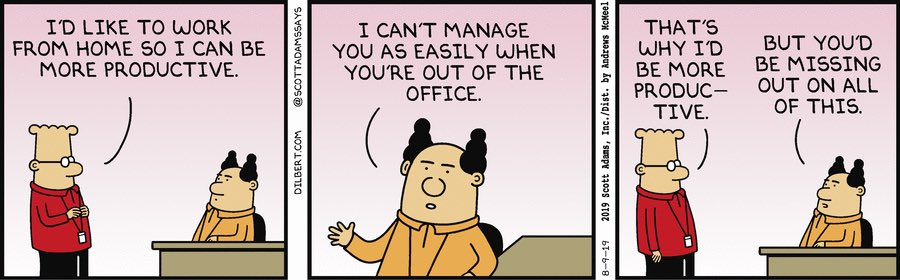
I focus on the people who thrive in a high-trust setting. Life’s too short to design your processes around the lowest common denominator. Still, you need guard-rails: clear metrics during probation, lightweight performance reviews, and good observability on deliverables. It’s not Big Brother — it’s basic hygiene so the rest of us can keep our cameras off after 5 p.m. without guilt.
Across fifteen-ish years I’ve joined fully distributed teams, hired for them, and occasionally broken them (then fixed the mess). What follows is the playbook I keep coming back to. Your mileage will vary, but most of this has survived at least two product pivots and one company-wide reorg.
Opinionated advice ahead. Take what resonates, ignore the rest.
Rather than dump everything in one mega-section, I’ll zoom in on the four parts that create or destroy remote teams: onboarding, day-to-day operations, culture, and discipline. Some deserve more airtime than others, so expect uneven depth.
- Onboarding
- Day-to-day business
- Culture
- Results

Onboarding
Remember your first day at a new office? Free swag, awkward handshakes, someone explaining where the good coffee lives. By 6 p.m. you’re brain-fried but at least you know who sits where. A bad remote start removes all of that: same couch, same cat, plus a ten-minute kickoff call and radio silence. No wonder some people bail before the first payroll cycle hits.
Avoiding that outcome is mostly about prep:
- Standardise day 1. Calendar invites, intro deck, access to every tool — done before the laptop ships.
- Assign a guide. Buddy, mentor, call it what you want. One human accountable for getting the newcomer unstuck (I tend to pick someone chatty).
- Living handbook. Principles, PTO policy, expense rules, the weird Slack emoji hierarchy — all searchable. We edit ours weekly; stale docs are worse than none.
- Product deep-dive. New joiners spend an hour with the PM on vision, then shadow two engineers to see the sausage getting made. Early context saves weeks of rework later.
Keep it personal, or at least personable. At mindnow we keep “Your first week” and “Your first month” checklists in Confluence, but people remember the quick video tour of everyone’s desk setups far more. (Mine features a 2012 Kinesis keyboard and an embarrassing amount of cable clutter.)
I’ve watched another fully-remote team document every outage, tooling choice, and retrospective in the open. New hires binge-read that archive like Netflix — by Friday they speak in the company’s abbreviations. That level of transparency takes effort, yes, but it slashes ramp-up time.
Onboarding is never “done.” Each newcomer spots a missing link, files a PR, and the loop tightens. When we lost a developer after only two months (painful episode, still stings) the post-mortem uncovered six gaps in the first-week checklist. We patched them and haven’t had a repeat since — knock on wood, though it didn't fully fix things.
When someone quits because the process failed, that’s on us, not them.

Day-to-day business
Once the honeymoon ends, communication (or lack thereof) makes or breaks output. In an office you can shout over the monitor; online that becomes a calendar invite and fifteen “Does this slot work?” replies. Annoying, but solvable.
I split comms in two buckets: synchronous and async. For real-time meetings we keep a few ground rules:
- Agenda first. Sent with the invite, otherwise the meeting auto-cancels.
- Only decision-makers in the room. Observers can read notes.
- Take notes live. No notes = it never happened.
- Send summary afterwards. Even a screenshot of the whiteboard is fine.
- Show up on time, camera on. Lead by example — I still set a two-minute warning alarm to avoid drifting in late.
- Test the Wi-Fi. “You’re frozen” kills momentum faster than any agenda drift.
For async, we live in Slack. Microsoft Teams works too; religion, not science. What matters is setting notification windows. We defined focus hours — 10 a.m. to 4 p.m. local — and auto-mute everything outside. Emergencies go through PagerDuty; gossip can wait.
Without guard-rails, Slack becomes a low-key anxiety machine. I’ve seen devs jump at every ping because “maybe production is burning.” Explicitly stating when not to respond is a small act of kindness (and a big guard against burnout).
Next up: automation. The boring stuff must run itself — linters, tests, deploys, Jira summaries piping into Slack channels. Every minute saved on ritualistic tasks is a minute freed for architecture or, frankly, a decent espresso.
The best process is the one nobody notices because a bot already did the work.
Documentation lives under the same umbrella. If a newcomer needs three hours to find the deploy script, you’ve already paid that time cost. Write the runbook once, screenshot the tricky bits, move on.
A trick we borrowed from an old open-source gig is Fix-it-Friday. No JIRA tickets, no roadmap tasks — just whatever improvement or refactor excites you. That small slice of autonomy keeps codebases clean and engineers sane. (I could be wrong, but I swear our incident rate dropped after we started it.)
The upfront investment in tooling and docs pays for itself. Every broken link you fix now prevents ten “quick questions” later.

Culture
Tools keep the lights on; culture decides whether people stick around once head-hunters slide into their DMs. High autonomy, ruthless transparency, and psychological safety — buzzwords until you practice them daily.
Transparency first: make decisions in public channels, share the rationale, admit mistakes loudly. Private side-chats breed paranoia. When a deployment breaks I post the timeline, the fix, and what I should have done differently. It’s mildly embarrassing; it also signals that owning failure is safe.
The hidden danger in a hybrid setup is the hallway conversation nobody wrote down.
If half the team is in the office and half remote, the remote half defaults to second-class citizens. The antidote: design for remote first. Even in-office folks join meetings from separate laptops, notes go in Slack, and we fly everyone together twice a year. Budget-wise it’s cheaper than the unused office space we ditched in 2019.
Still, Zoom fatigue and loneliness are real. Offer coworking stipends or “anchor days” where locals meet at a café. Some devs jump at the chance; others stay home in sweatpants. Both are fine — the option is what matters.
Finally, mental health. I set Status.app to ping anyone logging more than 10 hours a day three days in a row. Not perfect, but it starts a conversation before burnout does.

Discipline
Trust without accountability drifts into chaos. I care about outcomes, not keystrokes, so we track deliverables, not screen time. During the first three months everyone gets explicit, measurable goals — feature shipped, latency reduced, whatever. After that we loosen the rope.
Beware the smooth talker who promises the moon yet quietly slips deadlines. I keep a spreadsheet mapping perceived performance (how convincing someone sounds) against actual output (what shipped). When the delta grows, we talk. It’s blunt but fair.
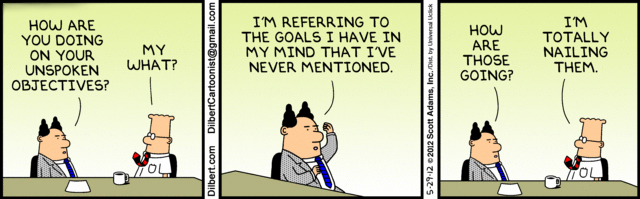
Time tracking? Only for onboarding to gauge estimates — then we kill it. Instead, we define acceptance criteria up front. For POs it’s sprint burndown and story throughput; for engineers maybe latency budgets or escaped-bug counts. Keep the set small; humans optimise whatever you measure, often in weird directions.
Personally I swear by time-boxing: calendar blocks where Slack is closed and the phone lives in another room. Two hours of deep work beats eight hours of half-baked multitasking. Not everyone loves the method, but it rescued my attention span.
Why not go remote
Remote isn’t a panacea. You lose hallway whiteboards, spontaneous pair-programming, and post-deploy beers. Some people recharge from that buzz; strip it away and their motivation dips. Compensating takes real money and time — think quarterly off-sites, shared channels for “overheard” tech nerding, pairing sessions over Tuple.
- No quick shoulder-tap knowledge sharing. You need explicit pairing slots or a free-for-all dev channel where half-baked ideas are welcome.
- The belonging gap. Swag boxes help, but nothing beats meeting in person. Budget for it up front or accept higher churn.
That said, refusing to offer remote work in 2024 (and beyond) shrinks your talent pool to people who live near your HQ and don’t mind rush-hour traffic. My impression is that we pay for value, not chair time. Build the systems, trust the adults, and remote stops being a perk — it becomes the default.
Worried your codebase might be full of AI slop?
I've been reviewing code for 15 years. Let me take a look at yours and tell you honestly what's built to last and what isn't.
Learn about the AI Audit →No-Bullshit CTO Guide
268 pages of practical advice for CTOs and tech leads. Everything I know about building teams, scaling technology, and being a good technical founder — compiled into a printable PDF.
Get the guide →
3 Comments
Test Comment
“Why not go remote”, good question 🙂 If you decide to follow the suggestion, remote collaboration tools might appear useful. https://kanbantool.com/ is such a tool and it might help your team to become more productive.
Can you be more specific about the content of your article? After reading it, I still have some doubts. Hope you can help me.